Kernel Panic in Linux Systems
-
A few days ago, I encountered a problem with a kernel panic. The issue occurred when I tried to install version 2.28 of the GNU C Library directly from the GitHub source code in my Ubuntu computer version 18.04. After attempting to restart my computer, I received an error message indicating a kernel panic.
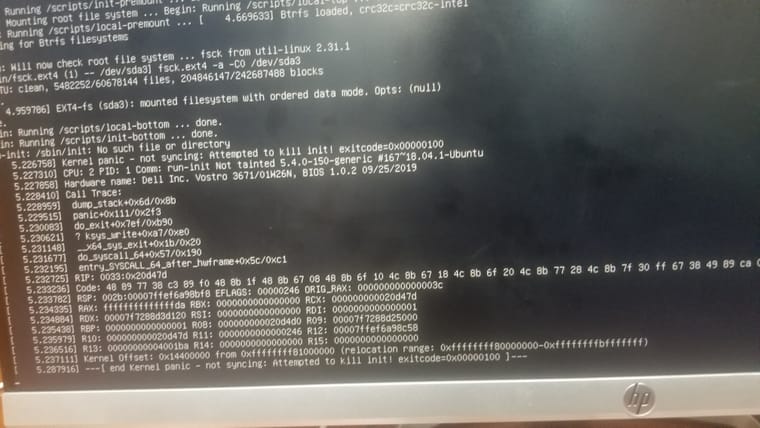
after searching of some internet resources i got these information
A kernel panic is one of several Linux boot issues. In basic terms, it is a situation when the kernel can't load properly and therefore the system fails to boot. During the boot process, the kernel doesn't load directly. Instead, initramfs loads in RAM, then it points to the kernel (vmlinuz), and then the operating system boots. If initramfs gets corrupted or deleted at this stage because of recent OS patching, updates, or other causes, then we face a kernel panic.
When a Linux system boot process starts after the Master Boot Record (MBR) step, GRUB is loaded. The kernel needs to be loaded into RAM to start the OS, but the kernel is situated on the hard disk (/boot/vmlinuz), and the hard disk is not yet mounted on /. Without mounting, no files can be accessed, even the kernel. To overcome this, first initramfs/initrd loads in RAM directly and mounts the /boot partition in read-only mode. Next, it mounts the hard disk on the / partition, and the process continues.
Main Causes of Kernel Panic
- If the initramfs file gets corrupted.
-
If initramfs is not created properly for the specified kernel. Every kernel version has its own corresponding initramfs. -
If the installed kernel is not supported or not installed correctly. -
If recent patches have some flaws. -
If a module has been installed from online or another source, but the initrd image is not created with the latest installed module.
I solved it by installing new OS, but that is a least way if you have important files you need to backup from your system
Any possible steps for Troubleshooting the problem.
